The club communication app where members talk and pay
The workspace for private communities, with membership fees built in.
Groupanda is a club communication app for associations and clubs whose members keep in touch by chat. Members join the group, follow the announcements and talk in channels, while a membership fee opens the channels for paying members. Fees are a monthly subscription or a one-time payment, and there is no member limit.


What is a club communication app?
A club communication app keeps an organization's announcements and conversations in one place, and some also let members pay a membership fee. Associations, sports clubs, hobby clubs and societies use this kind of tool. Nonprofit membership software and club management software are built around member records instead. Without either, the fees, the announcements and the conversation usually sit in separate tools.
Fees are matched to names by hand
Each transfer needs a name next to it before anyone gives that member access.
Announcements get buried
The date of the next meeting sinks under forty replies, and whoever was offline that evening never sees it.
Everything happens in one chat
The committee, the teams and the whole membership share one group chat, and every topic runs into the next.
Former members keep reading
Someone who stopped paying still reads everything in the group chat, because removing people is the job nobody wants.
And in Groupanda
Each member buys a plan from their own Groupanda account, so the plan's channels open with the payment and nobody matches names to transfers. Announcements have their own channel, and each topic gets a channel of its own. When a member's payments stop, the plan's channels close at the end of the paid period, and the free channels stay open to them. To remove someone completely, you can ban them, which ends their membership at once and stops them from rejoining.
If that one chat is a WhatsApp group, the WhatsApp group and community limits tell you how far it can grow.
What does Groupanda do for a nonprofit or a club?
Groupanda is a workspace with real-time chat in channels, on the web, on iOS and on Android. Only members see the conversations. For a nonprofit or a club, four parts of it do most of the work.
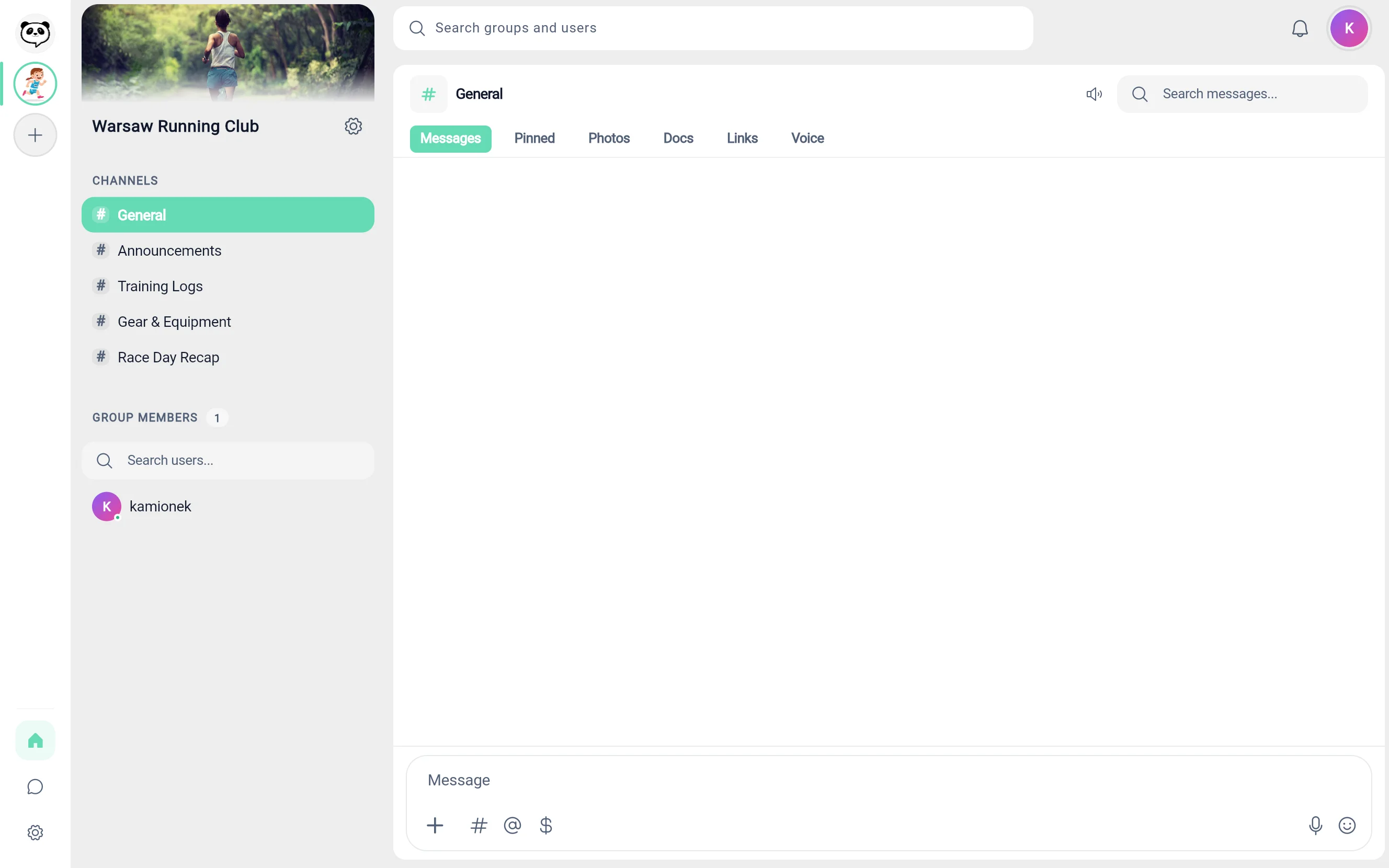
A read-only announcements channel
Every new group starts with an Announcements channel where only you post. You can let your admins post there too. Members read it, so the notice about the next meeting is not buried under replies.
Channels, and who can post in each
Each channel is open to every member, or limited to the plans you choose. Once your group has a plan, a channel can also be set to Admins only. You and your admins see every channel. In each channel, you choose who can post: you, you and your admins, or everyone. Make your committee admins, and they get a channel every member reads and only you and your admins post in. With a plan in the group, they can also have an Admins only channel. Admins can ban and mute members and delete messages.
Control over who joins
Joining can be open, by invitation through the group's invite link, or after you approve each request. In a paid group that needs approval, a member pays after you accept them. An open group is listed in Groupanda search, and a group joined by invitation or after approval is not. To bring members in, you share the invite link, app.groupanda.com/your-group.
A record of past years in each channel
Decisions stay in the channel where they were made, and a search within that channel finds them. Groupanda does not delete messages or files automatically.
In the screenshot
A club workspace in the Groupanda web app. The sidebar lists its channels, including Announcements, and the General channel is open next to them. The phone apps show the same workspace.
For channels, search, roles and joining in detail, read how Groupanda works as a group chat app.
How does your organization collect membership fees in Groupanda?
Members pay the membership fee, which many clubs call dues, through Stripe in the browser. The phone apps show your plans and send members to the browser to buy. Each plan is a monthly subscription or a one-time payment, and you can offer up to 5 plans side by side. Free channels stay open to every member, next to the channels of your plans.

Monthly subscription
The member pays every month. Access opens with the payment and ends when the paid period runs out. Members with a subscription get invoices and can update their card in a billing portal in the browser.
One-time payment
The member pays once and keeps access with no renewal date. Because nothing renews, a one-time payment is not a way to collect a yearly fee. It comes without an invoice.
A yearly fee as twelve monthly payments
Groupanda has no annual billing. If your fee is yearly, set one twelfth of it as the monthly price. If a member's payments stop before the year is over, access to the plan's channels ends when the paid period runs out.
Payouts
Payments go to the Stripe account you set up as the group owner. Members see the name set in that Stripe account on their statement, not Groupanda's. Stripe pays out on its own schedule. In Groupanda, you see your balance and how many members are on each plan, and the full history is in your Stripe dashboard.
In the screenshot
A group's Pricing section in Groupanda. Free joining is on, and two monthly plans are listed, each with its price and the number of members on it.
For plans, access and fees in detail, read how Groupanda works as a membership platform.
Groupanda for a nonprofit or a club, row by row
Every row is a fact, including the rows where the answer is no.
| What you need | In Groupanda |
|---|---|
| Announcements | A channel members read. You post, alone or with your admins. |
| Committee and team channels | Channels open to every member, or limited to the plans you choose. Once the group has a plan, a channel can also be Admins only. You choose who can post in each. No channel for chosen people. |
| Joining | Open, by invitation through the group's invite link, or after your approval. Only an open group is listed in Groupanda search. |
| Free and paying members | Free channels for every member and the channels of your plans for members who pay, in the same group. |
| Membership fees | Each plan is a monthly subscription or a one-time payment, up to 5 plans side by side. Members buy in the browser. |
| Yearly fee | No annual billing. Instead, a monthly price of one twelfth of the yearly fee. A member's payments can stop mid-year. |
| Where the money lands | The Stripe account you set up as the group owner. Stripe pays out on its own schedule. |
| Name on the member's statement | The name set in that Stripe account, not Groupanda's. |
| Payment overview | No list of who has paid. You see how many members are on each plan and your balance. The payment history is in your Stripe dashboard. |
| Treasurer access to billing | No. There is no treasurer role. |
| Payment emails to members | None about failed payments, refunds or ended subscriptions. |
| Nonprofit pricing | No separate rate for nonprofits. The free plan, and a 6% standard platform fee on paid groups. |
| Events and calendar | No. |
| Member import and export | No. |
| New owner after a board change | No. The owner of a group cannot be changed. |
| Apps | Web, iOS and Android. |
Last checked. This table describes Groupanda as of 27 September 2026.
When is Groupanda the wrong tool for your organization?
Check these before you move your members. Each one is a reason to choose a different tool.
- Your organization is built around events. Groupanda has no event pages and no calendar.
- You need to import your member list or export one. Groupanda cannot do either.
- Your treasurer needs individual payments and their history in the same tool as the members. In Groupanda, the group owner sees how many members are on each plan and the balance. The payment history stays in the Stripe dashboard, and there is no treasurer role.
- You need to collect the yearly fee in one charge that renews every year. There is no annual billing, and with twelve monthly payments a member's payments can stop before the year is over.
- You rely on automatic notices when a payment fails. Groupanda sends members no emails about failed payments, refunds or ended subscriptions.
- Your board changes and the group has to change hands with it. The owner of a group cannot be changed, so the group stays with the person who created it.
Groupanda fits an organization whose members keep in touch by chat and pay the membership fee online.
If you are also considering Slack, a separate page covers Slack's per user pricing and who its nonprofit discount leaves out.
Is there a separate price for nonprofits?
No. Groupanda has no separate rate for nonprofits. A nonprofit's group can run on the free plan, which has no member limit and no time limit. In a paid group, the member pays the price you set. Out of that payment, Groupanda keeps a 6% platform fee. Stripe's processing fee is deducted from your payout. Nothing is added on top of what the member pays. Stripe Connect pays out to the United States, the United Kingdom, the European Union, Norway, Liechtenstein, Canada, and Switzerland. Groupanda charges no monthly fee and no fee per member.
Questions nonprofits and clubs ask
Is Groupanda free for nonprofits?
Yes, and there is no separate nonprofit rate. You can run your nonprofit's group on Groupanda's free plan, with no member limit and no time limit, and without a card. In a paid group, the member pays the price you set. Out of that payment, Groupanda keeps a 6% platform fee. Stripe's processing fee is deducted from your payout. Nothing is added on top of what the member pays. Stripe Connect pays out to the United States, the United Kingdom, the European Union, Norway, Liechtenstein, Canada, and Switzerland.
Can members pay an annual membership fee?
Groupanda cannot take an annual membership fee as one yearly charge, because it has no annual billing. Each plan is a monthly subscription or a one-time payment. A one-time payment never renews, so it would not end access after the year. A yearly fee can be charged as a monthly price of one twelfth of it. If a member's payments stop before the year is over, access to the plan's channels ends when the paid period runs out. Membership of your organization, outside Groupanda, still follows its own rules.
Who receives the membership fees, our organization or Groupanda?
Membership fees paid in Groupanda go to the Stripe account you set up as the group owner, not to Groupanda. Stripe pays out on its own schedule. The member pays the price you set. Out of that payment, Groupanda keeps a 6% platform fee. Stripe's processing fee is deducted from your payout. Nothing is added on top of what the member pays. Stripe Connect pays out to the United States, the United Kingdom, the European Union, Norway, Liechtenstein, Canada, and Switzerland.
Can our treasurer see the payments?
Not in Groupanda. Groupanda has no treasurer role and shows no individual payments or payment history. As the group owner, you see your balance and how many members are on each plan, and the full history is in your Stripe dashboard.
Can we import or export our member list?
No. Groupanda cannot import or export members. Members join through the group's invite link, which you share. Joining can be open, by invitation through that link, or after your approval, and an open group is also listed in Groupanda search.
Last updated:
Run your nonprofit or club on the free plan
Create your group, post in the Announcements channel it starts with, and share the invite link with your members. Turn on paid access when you are ready. No card needed to start.